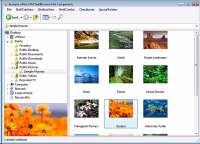
The ShellBrowser .Net Edition gives a programmer easy access to the Windows shell functionality. The controls look and behave exactly like the corresponding parts of the Explorer and are Unicode enabled.
The ShellBrowser .Net Edition is a set of UI controls that look and behave exactly like the Windows Explorer. The ShellListView and ShellTreeView controls imitate the corresponding parts of the Windows Explorer, including correct icons with overlays, the Explorer context menu, thumbnails, details, virtual folders and shell extensions. Beyond the normal Explorer look & feel, these controls support file filters, check boxes and allow the customization of many aspects of their appearance and behavior. The invisible ShellControlConnector control allows you to synchronize multiple shell controls with just one line of code. An additional thumbnail control displays previews of the selected files in any size. An interesting sample project and a detailed help file are included.
Requirements:.Net Framework 2.0 or higher
Operating system:Windows XP / Vista / Vista 64 bit / 7 / 7 64 bit / 8 / 8 64 bit / 2003 / Server 2012
Limitations:30-day trial with popup window outside IDE
Release notes:Minor Update

ActiveX Charting Control offers hundreds of Graph styles in 2D and 3D, 33 mathematical and statistical Functions for you to choose from together with an unlimited number of axes and 17 toolbox components. For Windows and the Web.
Price: $449, Rating: 7, Downloads: 170
Download

The Chilkat C++ class library for VC++ 7.0 fully supports SMTP, POP3, MIME, HTML, SSL, S/MIME, secure authentication, attachments, SSL, progress monitoring, zip and unzip of attachments, XML import/export, and is fully internationalized to handle email in
Price: $99, Rating: 8, Downloads: 152
Download

Object-Oriented Charting component library completely written in PHP and ready to be used in any PHP scripts. It includes full source code meaning that no loaders have to be used in order to create a Graph on servers.
Price: $, Rating: 8, Downloads: 151
Download

OPC DA .NET Server Toolkit
Price: $0, Rating: 5.5, Downloads: 147
Download

In short, Colock is a software based lock for making your software copy protected. By adding just one line of code to source code of your program, you will be able to use powerful copy protection system of Colock.
Price: $45.00, Rating: 8, Downloads: 137
Download 
 ShellBrowser .Net Edition 5.2.1